This articles contains a setup guide to install and preserve multiple CUDA versions in a single machine.
Steps
1. Download .run file from NVIDIA
For example, search “NVIDIA CUDA 11.8 download” in your browser, and go to the NVIDIA CUDA Toolkit Archive.
Note that you should download the runfile (local) installer.
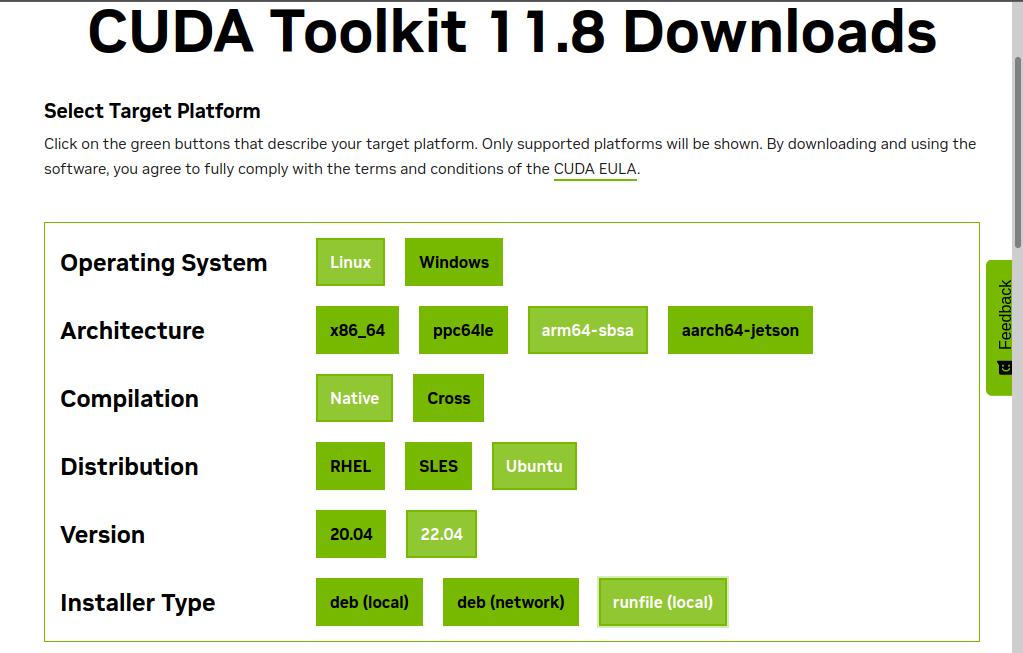
2. Install CUDA
Run the downloaded .run file, for example:
$ sudo sh cuda_11.8.0_520.61.05_linux_sbsa.run --silent --toolkit --override --installpath=/usr/local/cuda-11.8
The available options can be found at the NVIDIA CUDA Installation Guide for Linux.
Note that --toolkit is designated to only install the CUDA toolkits such as nvcc and Nsight, without installing the CUDA driver. For those who want to install the driver as well, refer to the --driver option. But mostly, compiling the previous CUDA scripts is enough with the nvcc compiler.
3. Set (Update) Environment Variables
Here is a CUDA configuration in my .zprofile file:
# CUDA configuration
if [ -d "/usr/local/cuda-13.0" ]; then
  export CUDA_HOME=/usr/local/cuda-13.0
  export PATH="$CUDA_HOME/bin:${PATH#"$CUDA_HOME/bin:"}"
  export LD_LIBRARY_PATH="$CUDA_HOME/lib64:${LD_LIBRARY_PATH#"$CUDA_HOME/lib64:"}"
fi
## Change CUDA version
## You can run `$ cuda128` to switch to CUDA 12.8
cuda118() {
  export CUDA_HOME=/usr/local/cuda-11.8
  export PATH="$CUDA_HOME/bin:${PATH#"$CUDA_HOME/bin:"}"
  export LD_LIBRARY_PATH="$CUDA_HOME/lib64:${LD_LIBRARY_PATH#"$CUDA_HOME/lib64:"}"
}
cuda128() {
  export CUDA_HOME=/usr/local/cuda-12.8
  export PATH="$CUDA_HOME/bin:${PATH#"$CUDA_HOME/bin:"}"
  export LD_LIBRARY_PATH="$CUDA_HOME/lib64:${LD_LIBRARY_PATH#"$CUDA_HOME/lib64:"}"
}
cuda130() {
  export CUDA_HOME=/usr/local/cuda-13.0
  export PATH="$CUDA_HOME/bin:${PATH#"$CUDA_HOME/bin:"}"
  export LD_LIBRARY_PATH="$CUDA_HOME/lib64:${LD_LIBRARY_PATH#"$CUDA_HOME/lib64:"}"
}
- You might be allowed to use
~/.bashrc,~/.zshrc,~/.profile, or etc. instead of~/.zprofiledepending on your shell and preference. - You can change your current CUDA version by running the corresponding function, for example:
$ cuda118 # for CUDA 11.8
- Without this configuration, you might want to run your commands with the temporal environment variables, for example:
$ CUDA_HOME=/usr/local/cuda-11.8 PATH="/usr/local/cuda-11.8/bin:${PATH}" LD_LIBRARY_PATH="/usr/local/cuda-11.8/lib64:${LD_LIBRARY_PATH}" YOUR_COMMAND